I’ve been working on a Hog project for the last while, and I was super frustrated with trying to get the CITP Viz connection to work. In brief- the reason is there is a small bug in the software. With Viz turned on, I would go to the Visualizer Settings to get Hog to see my Capture computer. Once I had chosen the Capture computer from the top pulldown, I would click Apply but I didn’t look closely enough:
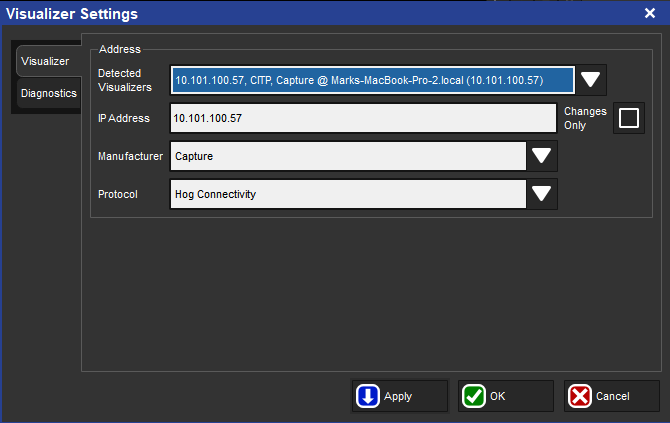
Notice that Hog has not chosen the correct Protocol. Instead of CITP (what you need for Capture to work), it has selected Hog Connectivity. Change that to CITP with the pulldown so it looks like this.
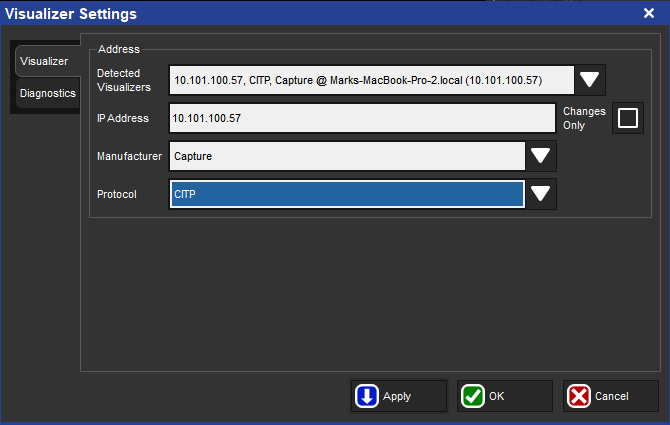
Hit Apply and close the window after. Problem solved.
***
Mark LaPierre is a programmer in film, television and theater based out of Albuquerque. He grew up in live entertainment and has been a designer/programmer for musicals, concert dance, live music, circus and corporate. Mark is a proud member of IATSE, an ETC Eos trainer and an enthusiastic trainer of many other platforms and subjects. He offers remote console coaching in 30 minute to 4 hour times as well as a full range of training in person. If you enjoy his content, please consider commenting on his posts on the website to appease the Algorithm.
2 comments