As I’ve been working on the new Lightwright manual, I’ve gone through many files to find one that suits the particular work flow I was needing to document. At one point, I returned to a file from 2017 and was confused as I couldn’t find my addresses. Nothing was under Addresses, so I looked for the Dimmer column, and I couldn’t find it. If you are in the same position, here’s your answer:
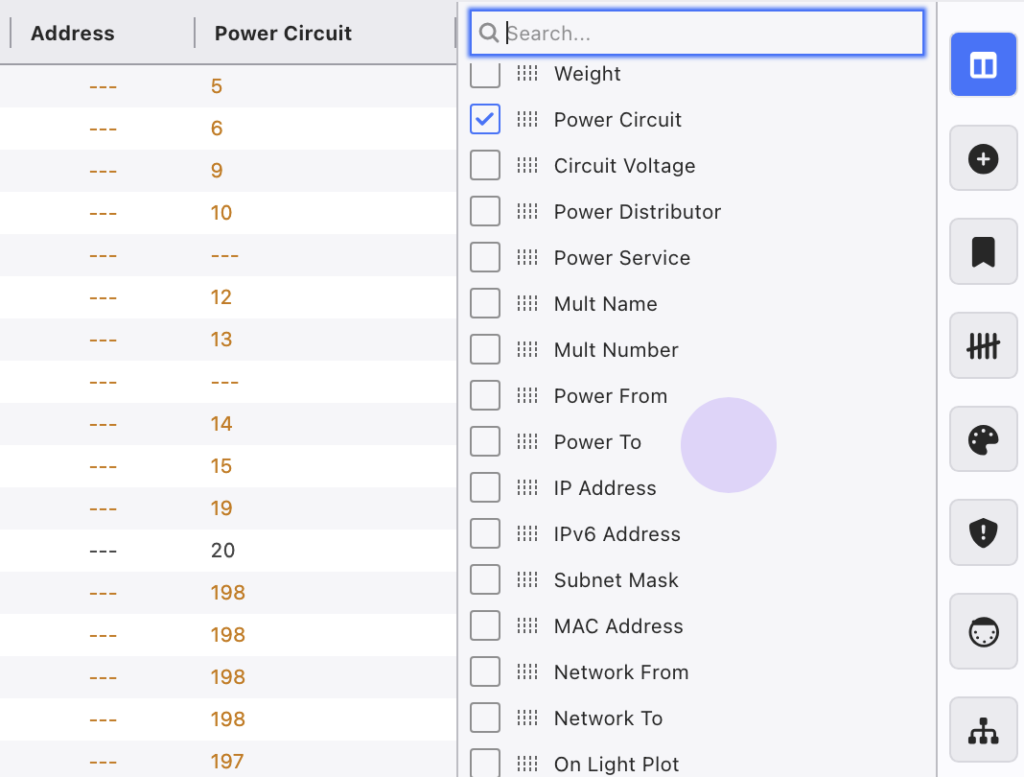
The Dimmer column was renamed to the Power Circuit column.
Navigate to the Column Side Tab, turn on Power Circuit, then copy and paste the data over to Address. (Right clicking on the header and it’s easy to select all the cells in the column.)
I can’t imagine this will be a common issue, but it might be confusing to users who (like me) hadn’t returned to an old file in quite some time.
In case the first line wasn’t obvious- I’ve been working for Lightwright, but this post is not sponsored- it’s just my usual stuff of creating content to share solutions.
Anyone checked out the new Lightwright yet? Honestly- I’m a fan. If you have confusions or work flow questions, feel free to hit me up. (Though obviously- please read the manual or watch any of the videos I’ve made and will continue to make first!)
***
Mark LaPierre is a programmer in film, television and theater based out of Albuquerque. He grew up in live entertainment and has been a designer/programmer for musicals, concert dance, live music, circus and corporate. Mark is a proud member of IATSE, an ETC Eos trainer and an enthusiastic trainer of many other platforms and subjects. He offers remote console coaching in 30 minute to 4 hour timesas well as a full range of training in person. If you enjoy his content, please consider commenting on his posts on the website to appease the Algorithm.
2 comments