Recently, I was on a commercial gig and realized something had happened to my network switch, as it was dropping universes. This is a very stressful thing to happen on set. It was a small truck package with about 5 universes active. A good trick for these events is to patch some dimmers (that control no actual lights), set them in an effect and let them run. However, three of my universes were full with no room for that.
Since I’m an Eos programmer, I went to Patch and was considering shifting to Artnet when I finally noticed something I had seen for quite a while, but never used: the Unicast column in Patch>Protocols.
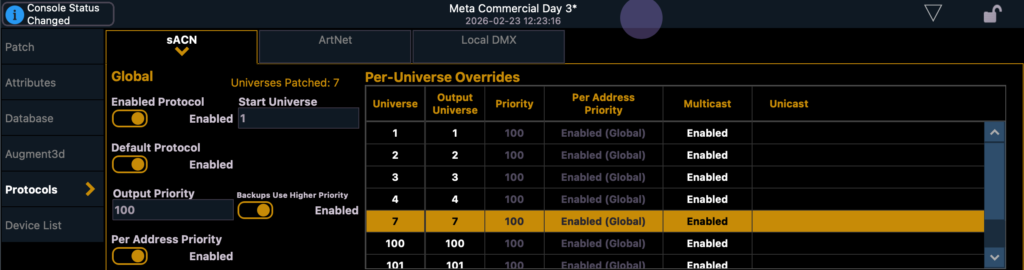
I’m pretty good at networking, but nowhere near as knowledgable as I wish to be. So I’d never played with Unicast before. It occurred to me that I might be having either a multicast problem or can EEE problem. Of the two, multicast was more likely. So I decided to try Unicast and see if that made a difference.
I input the IP address of the Stardust in each line and watched as all the universes locked on on the front of the unit. If you already are familiar with multicast issues- you know that locking on isn’t the issue. It’s staying locked on. So I spent a very hyper-aware first hour looking at the Stardust over and over. It stayed locked on.
Over the weekend, I left the console setup with the Stardust to test. I didn’t change anything for output since an EEE problem would be tied to lack of changes in output. It stayed locked on the whole 30 hours I tested.
Later- I was having yet another struggle getting Hog to connect with Capture. While I was spinning my wheels and doing the same tricks over and over again waiting for a handshake, I noticed the Unicast column in Hog as well. I assigned the IP address of the Capture computer and it instantly locked and stayed that way.
I want to be sure to repeat- I’m not a networking expert. I’ve learned how to setup and troubleshoot networks but that doesn’t mean I have the depth of underlying knowledge to tell you definitively WHY something works. But this works and for some of the most irritating kinds of problems. I’m happy to have another trick to try when my network is being difficult.
What mysterious network issues have you been hit with? Let me know in the comments.
***
Mark LaPierre is a programmer in film, television and theater based out of Albuquerque. He grew up in live entertainment and has been a designer/programmer for musicals, concert dance, live music, circus and corporate. Mark is a proud member of IATSE, an ETC Eos trainer and an enthusiastic trainer of many other platforms and subjects. He offers remote console coaching in 30 minute to 4 hour times as well as a full range of training in person. If you enjoy his content, please consider commenting on his posts on the website to appease the Algorithm.
5 comments