Friends, there are times when I write you a tutorial and I’m a bit embarrassed. This is one of them. I’m a long time user of Lightwright- since version 3. I recently became aware that I never learned the way LW intended us to do sequential numbering in version 6.
Lets say you need to renumber a series of channels from 1 thru 20 to 1001 thru 1020. Highlight the channels in the column.

Type the starting number + the increment. So in the example, you would type:
1001+1 Enter
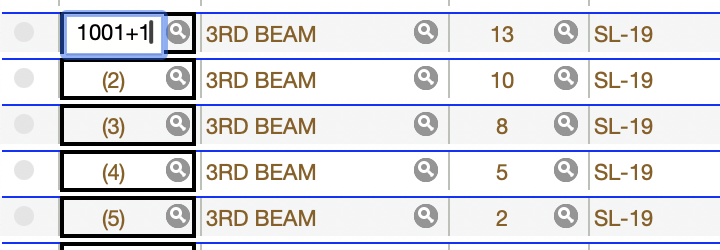
The renumbering happens automatically.

What if you wanted to do addressing, and you had some color source fixtures that were set to Direct mode? That takes up 6 addresses per fixture. So again- highlight the addresses field for those lights. Assuming you are starting with Universes 1, Address 1 type:
1/1+6 Enter
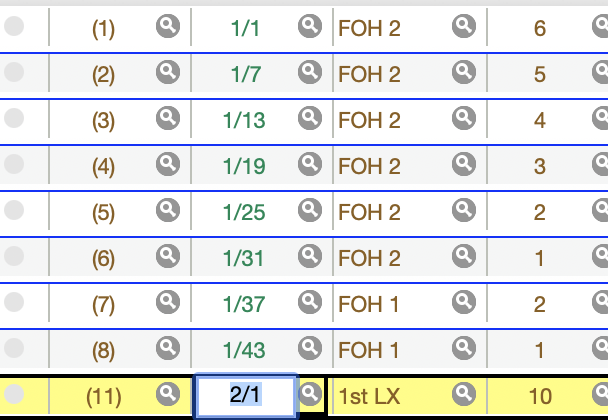
That’s all there is to it. And it would have save me TONS of time on shows over the last several years. But better late then never.
What simple yet powerful command did you learn really late in your game? Hit me in the comments.
***
Mark LaPierre is a programmer in film, television and theater based out of Albuquerque. He grew up in live entertainment and has been a designer/programmer for musicals, concert dance, live music, circus and corporate. Mark is a proud member of IATSE, an ETC Eos trainer and an enthusiastic trainer of many other platforms and subjects. He offers Zoom console coaching in 30 minute to 4 hour times as well as a full range of training in person. If you enjoy his content, please consider commenting on his posts on the website to appease the Algorithm.