Recently, I’ve been asked to create effects that stop on a cue. The first time I did it, I added a Global Effect fader next to the submaster that had the effect so I could stop the effect with a button. But I now know that wasn’t necessary- I could just change the buttons on the Fader itself.
Create your effect Sub. Mine has a small paparazzi effect. Double tap Sub to get to Tab 15 Submasters. I change my settings here to Record Exclude, Priority 5 and LTP since that insures the best behavior for this effect, but you do you. If it’s helpful- notice I have not changed this Submaster to be an Effect Sub. It filters everything that is not the effect and the selection out of the Sub, and that is seldom useful to me. Take a look over to the lower left of your screen. This is what you see.
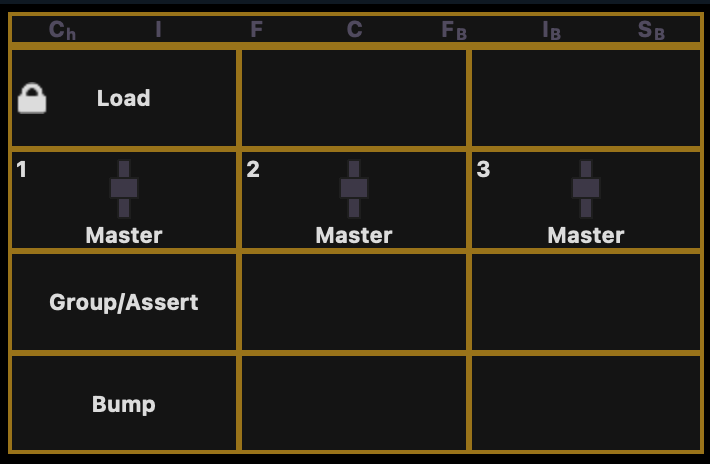
The load button at the top is locked- you can’t edit that one. But the other two (and the fader) you can. Group/Assert is the one I would replace, since I love the Bump button for my work. Click where it says Group/Assert and a popup appears with your options.
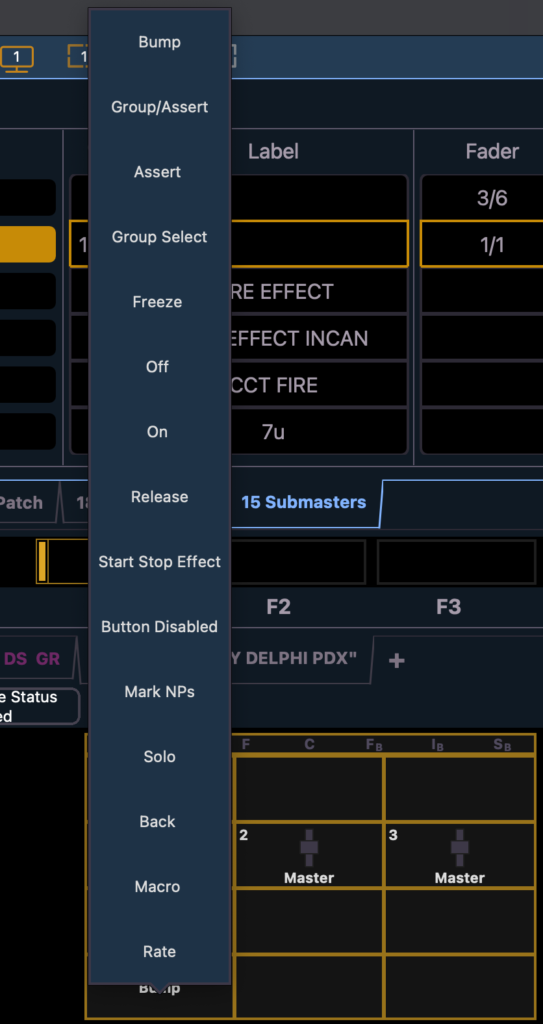
Choose the one in the middle that says Start Stop Effect, but take a moment to look at the other options, including the options under Fader (currently set to Master).
Once you have chosen that option, run your effect by raising your fader. Then you can press Start Stop Effect to stop and restart it. And unlike the Global Fader, it won’t affect any other effects that are running.
It’s amazing to me that I’ve been programming this console since it came out and have been teaching this console for years, but I still have more to learn. It’s actually one of my favorite things about being a programmer: I will never be done learning.
What little hidden console treasure have you recently discovered? Share in the comments!
***
Mark LaPierre is a programmer in film, television and theater based out of Albuquerque. He grew up in live entertainment and has been a designer/programmer for musicals, concert dance, live music, circus and corporate. Mark is a proud member of IATSE Local 28 and 480, an ETC Eos trainer and an enthusiastic trainer of many other platforms and subjects. He offers remote console coaching in 30 minute to 4 hour times as well as a full range of training in person. If you enjoy his content, please consider commenting on his posts on the website to appease the Algorithm.
3 comments